Molly Design
下载 macOS 版Download for macOS

Mac 桌面应用Mac app

给平面设计师的 AI 设计工具。
每一层都能接着改。
AI design for graphic designers. Every layer stays editable.

说清楚要做的海报、社媒图或主视觉,拿回来的是分好层的稿子。改字、挪位置、换图都在原稿上做,不用从头生成。Describe a poster, a social post or a key visual, and get it back in layers. Change the type, move things and swap images on the same file, without starting over.

适用于 Apple Silicon Mac · 应用经 Developer ID 签名并通过 Apple 公证For Apple Silicon Macs · App signed with Developer ID and notarized by Apple

示意动画Illustration

  • 原生NativeApple Silicon 原生 · 应用已通过 Apple 公证Built for Apple Silicon · App notarized by Apple
  • 本地Local作品、版本和对话都留在你的 Mac 上Artwork, versions and chats stay on your Mac
  • 自带密钥Your keys用你自己的模型和密钥,不需要 Molly 账户Your own models and keys. No Molly account
  • 更新Updates在应用里检查更新,也可以随时手动下载Check for updates in the app, or download any time

产品演示Product demo

在 Molly 里实际截下来的Captured in the app

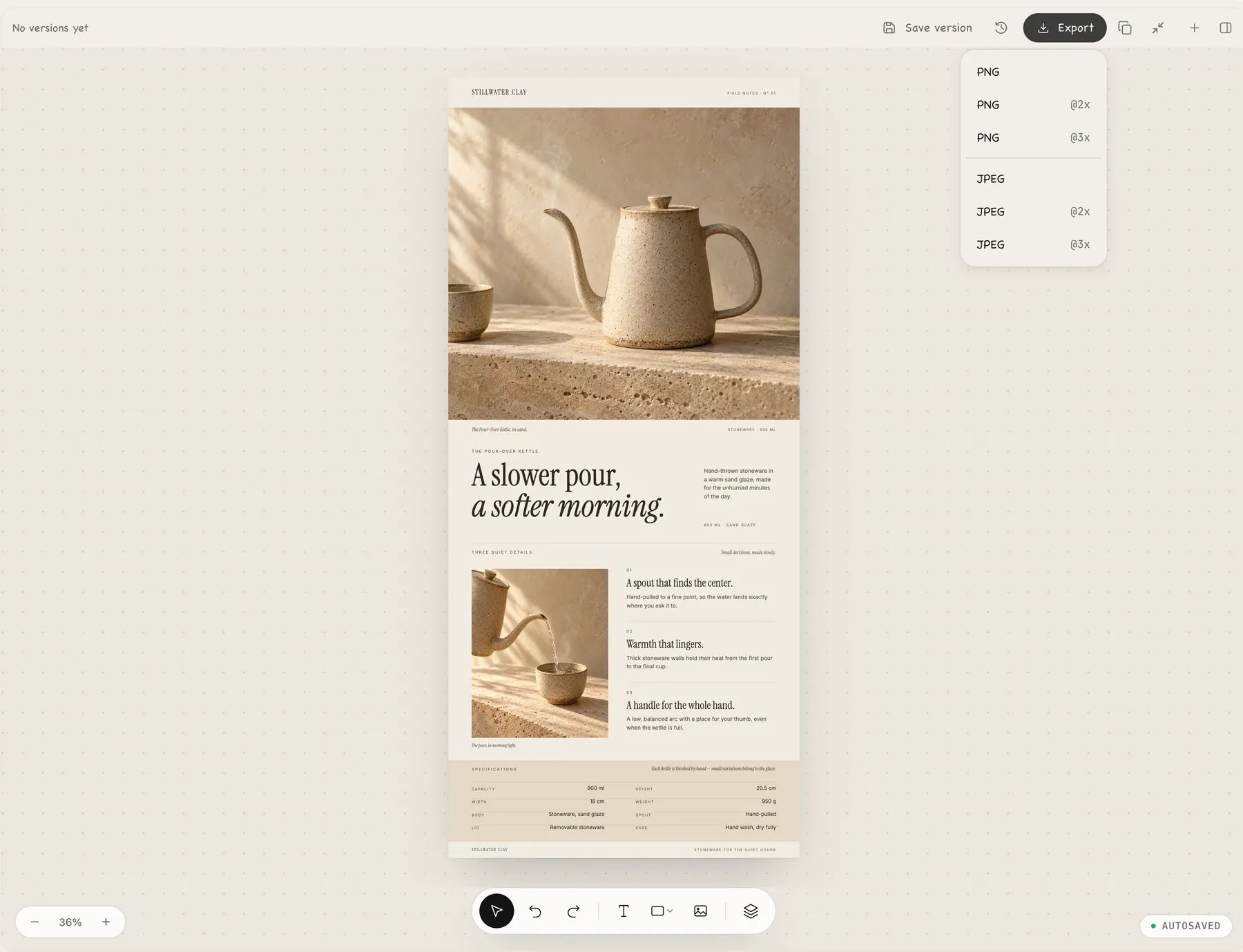
真实录屏和截图,不是效果图:一段改字的短录屏,以及展开的导出菜单。A real screen recording and a real screenshot, not mockups: changing one word, and the Export menu.

Molly Design · 改一个词Change a word真实录屏Real recording

选中标题,直接改字。图层面板里的名字跟着变,文件自动保存。Select the headline and type. The layer name in the Layers panel updates with it, and the file autosaves.

工作流程Workflow

从简报到交稿From brief to delivery

按真实接单的顺序走一遍:写简报、找参考、挑方向、落图层、回修、导出。One job in the order real work goes: brief, references, direction, layers, revisions, export.

写简报Write the brief

像给同事交代活儿一样The way you’d brief a colleague

选好尺寸,用一两句话说清楚要做什么、给谁看、想要什么感觉。内置尺寸有方图、竖版、竖屏、横版和长图,也可以交给 Agent 自己判断。Pick a size and say in a sentence or two what it is, who it’s for and how it should feel. Square, portrait, story, landscape and long-image presets are built in, or let the agent decide.

新建设计New design示意Illustration

找参考Find references

Agent 自己上网看The agent looks for you

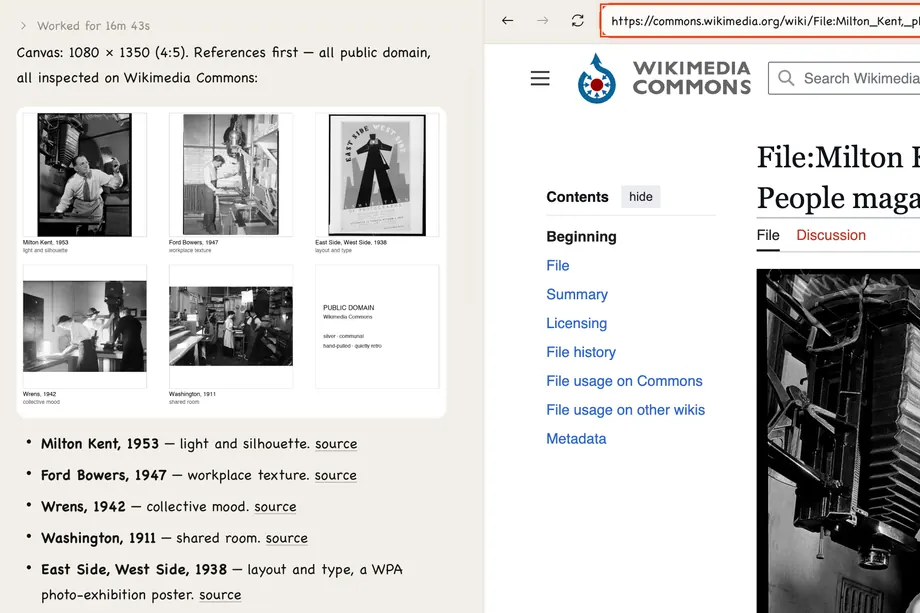
需要的时候,Agent 会打开内置浏览器去找参考,比如维基共享资源里的公版老照片和海报,再一条条告诉你它从中借鉴了什么。When the job calls for it, the agent opens the built-in browser to find references, such as public-domain photos and posters on Wikimedia Commons, and notes what it took from each one.
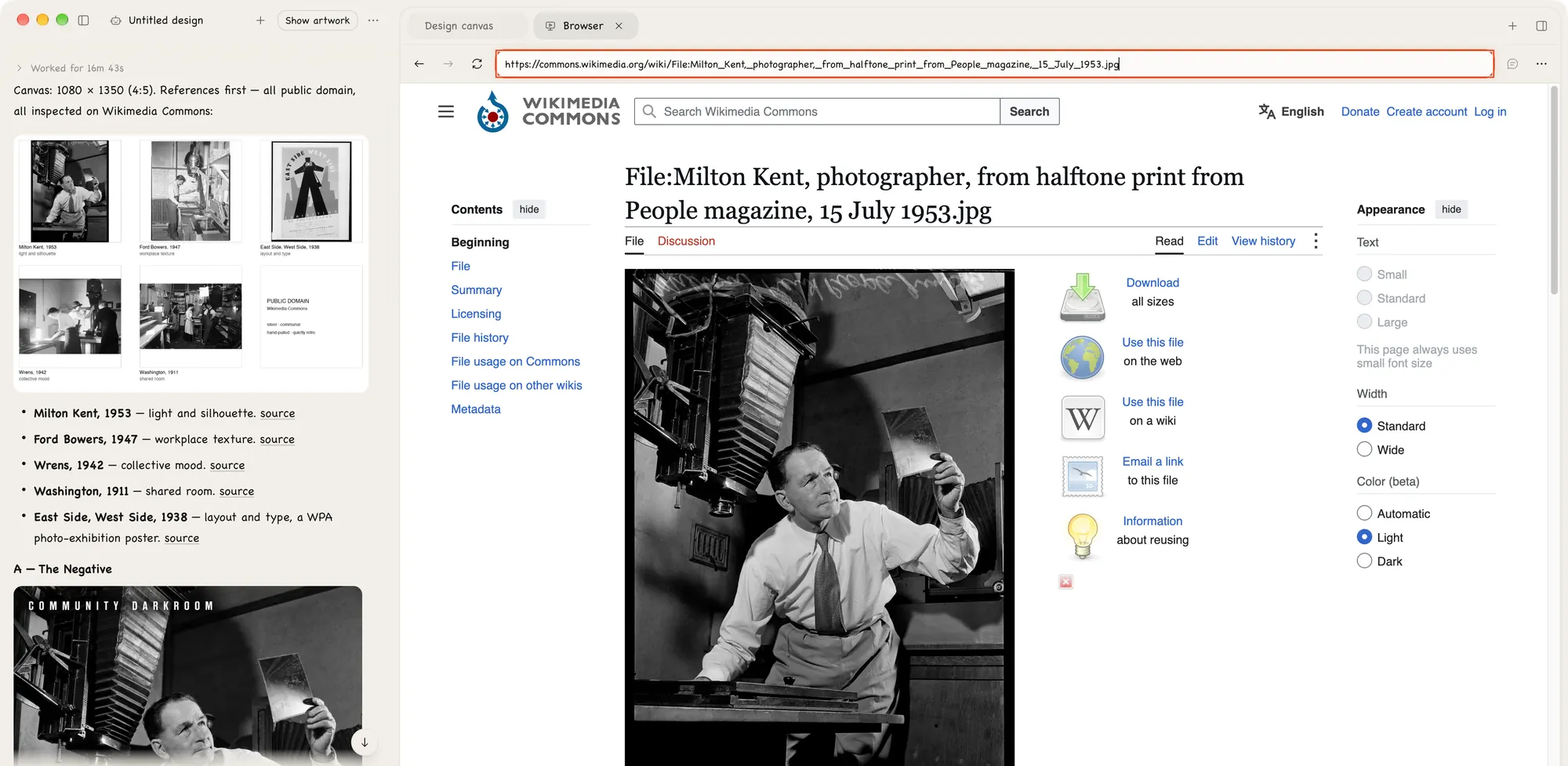
内置浏览器Built-in browser真实截图Real capture
The agent lists public-domain references for a darkroom open-house poster, with a Wikimedia Commons file page open in the built-in browser

挑方向Pick a direction

几套方向,你来选A few directions, you choose

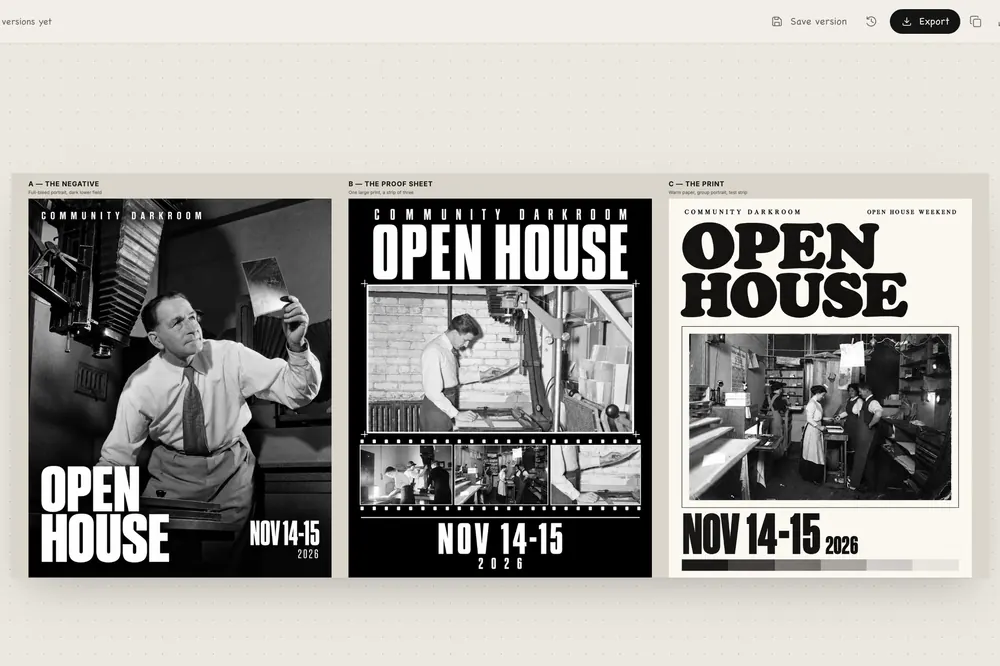
Agent 把几套方向并排放到画布上,附上每套的思路。你挑中一套,它就照这个往下做。The agent lays a few directions side by side on the canvas, with a note on each. You pick one and it builds from there.
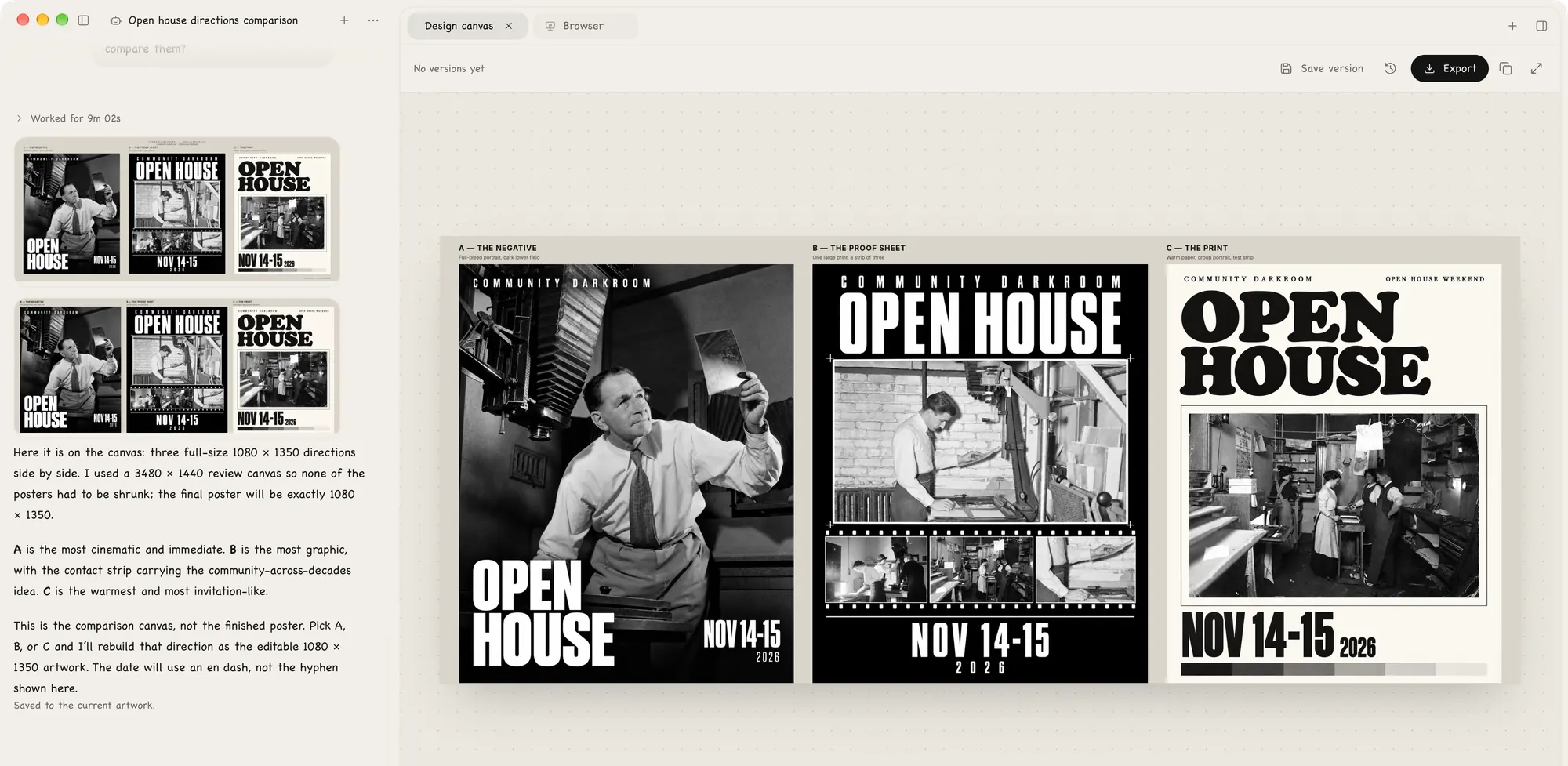
方向Directions真实截图Real capture
Three directions for a community darkroom open-house poster side by side on the canvas, with the agent’s note on each in the chat

落成图层Build the layers

文字、形状、图片各占一层Type, shapes and images each get a layer

选定的方向会做成图层:文字是真文字,圆和线是形状,背景是图片。每一层都在图层面板里,可以选中、对齐,也可以填精确的数值。The chosen direction is built as layers: real text, vector shapes and an image background. Each one sits in the Layers panel, where you can select it, align it and type exact values.
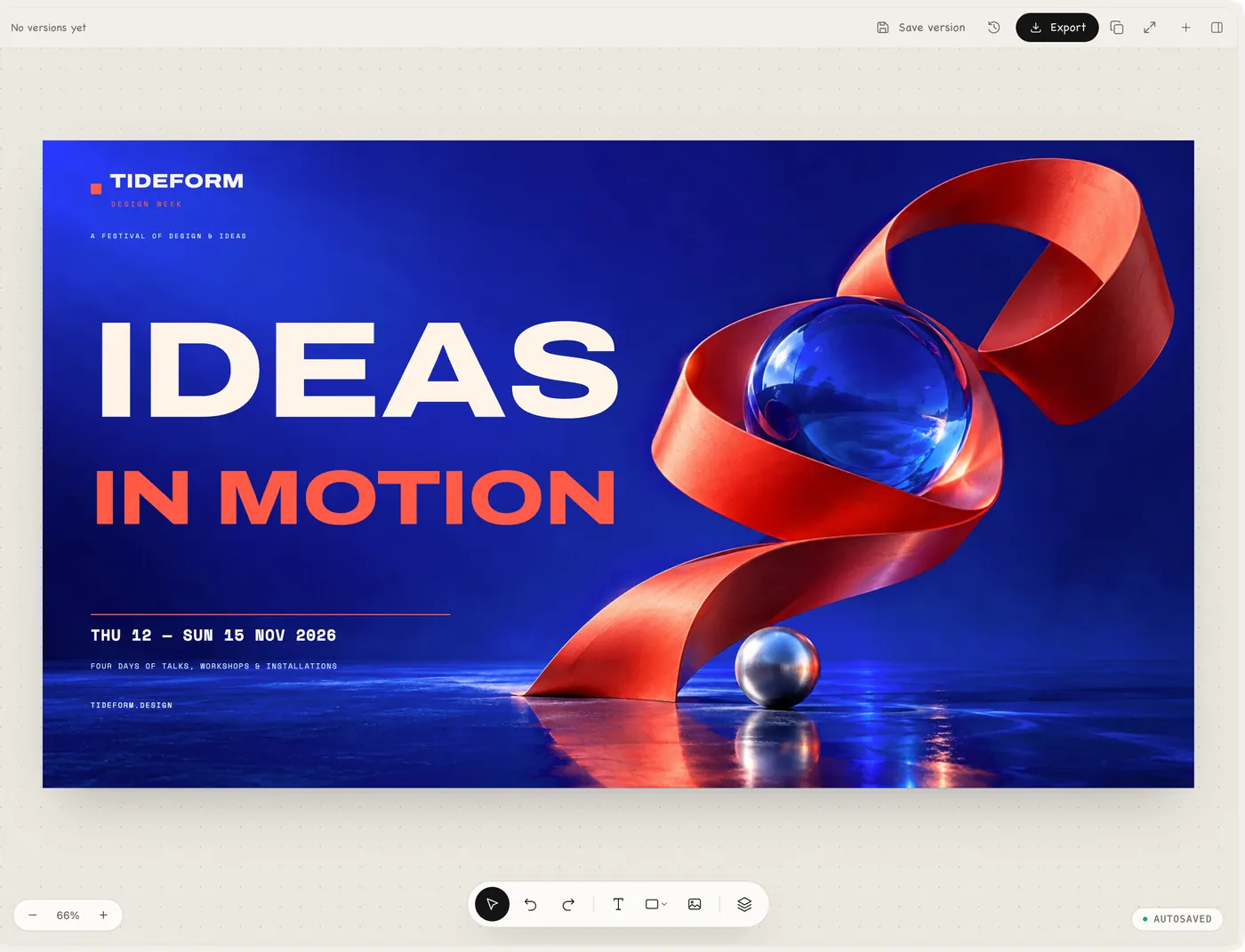
图层Layers真实截图Real capture
A design-week key visual on the Molly canvas, with the layer, text and shape tools below

客户回修Client revisions

每一轮改的都是同一份文件Every round, the same file

客户想换个词,你选中文字直接改。要改得多一点,就在对话里交给 Agent,不满意还能回到之前保存的版本。If the client wants a different word, select the text and change it. For bigger changes, ask the agent in chat, and go back to an earlier saved version if you don’t like the result.
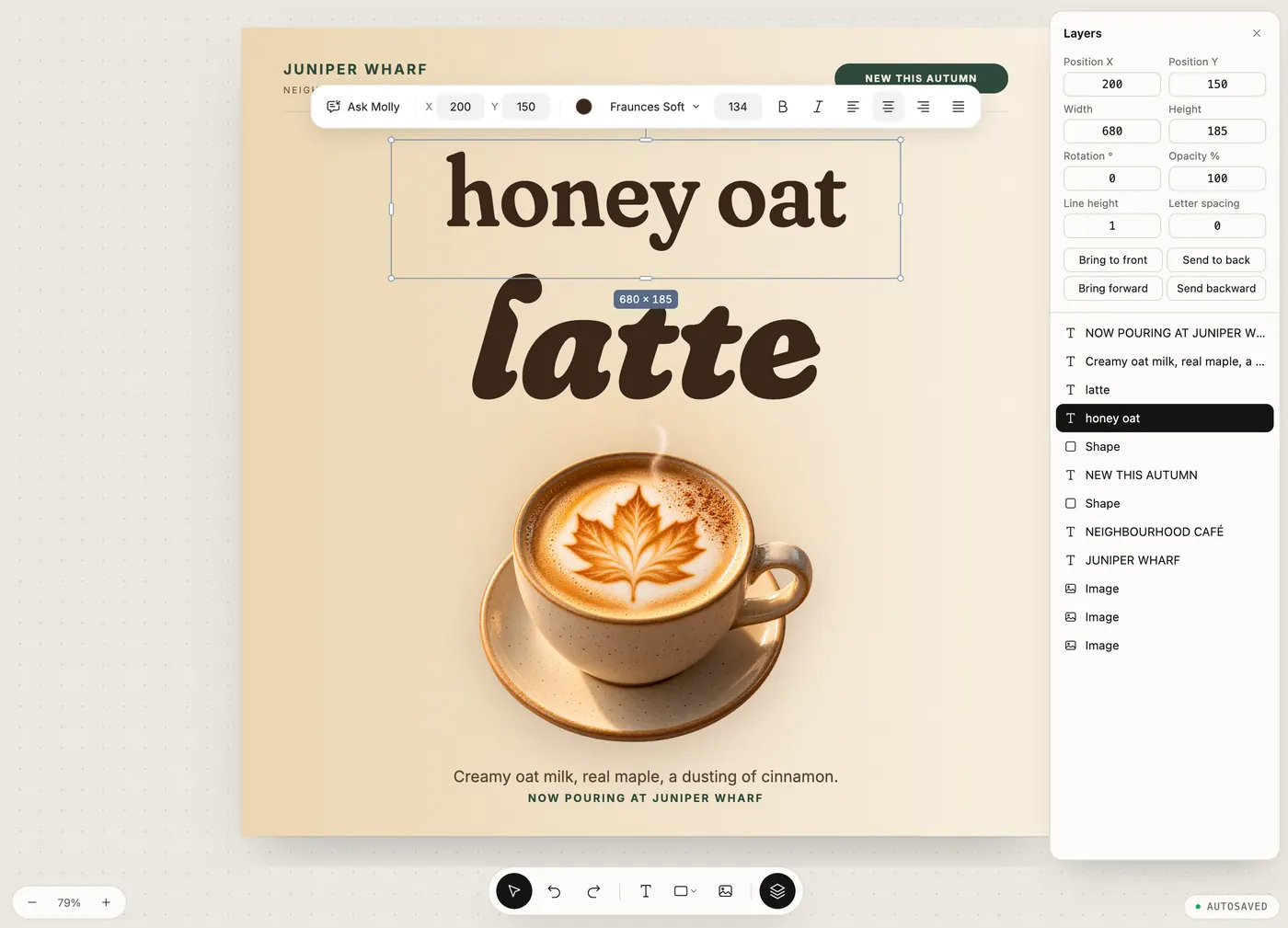
改标题Editing the headline真实截图Real capture
A café poster with its headline changed to “honey oat”, the text box still selected and the matching layer highlighted in the Layers panel

导出交付Export

PNG 或 JPEG,三档倍率PNG or JPEG at three scales

保存后导出。交给客户的是导出的图,可编辑的工程和历史版本留在你的 Mac 上,下一轮接着改。Save, then export. Your client gets the image. The editable file and its saved versions stay on your Mac for the next round.

导出Export示意Illustration

下一轮改稿来了,你打开的还是同一份文件。When the next round of changes comes in, you open the same file.
为什么是 Molly · 分层Why Molly · Layers

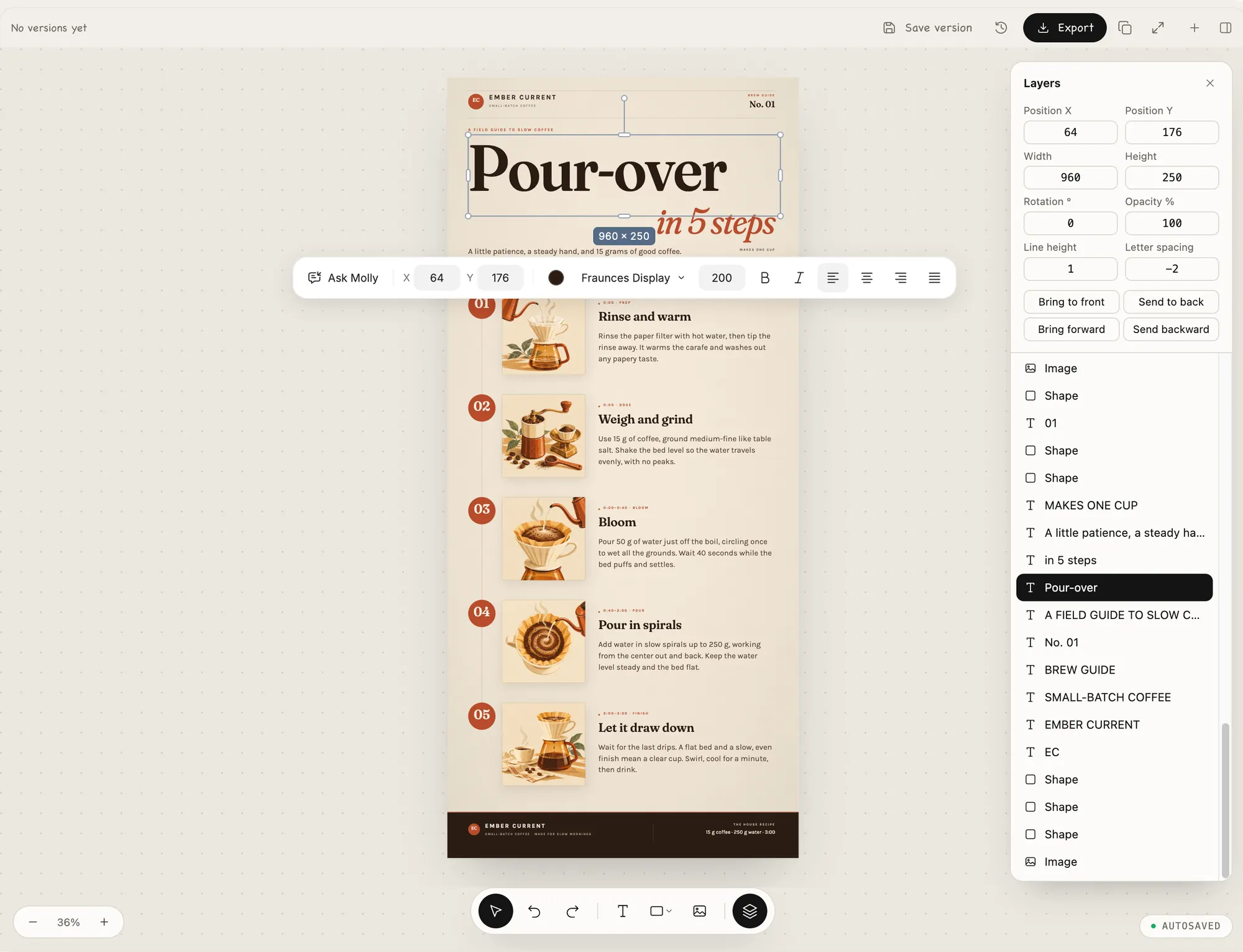
不是一张图,是一份能改的稿Not a flat picture. A file you can keep working on

一键出图给你的是一张扁平图片,改一个字就得重来。Molly 交给你的稿子已经分好层。One-shot tools give you a flat picture, and changing one word means starting over. Molly gives you a file that is already in layers.

Molly Design · 图层Layers真实截图Real capture
The Pour-over headline text layer selected on a coffee guide: selection handles on the canvas, a floating toolbar with font and size, and the Layers panel highlighting the row with its position and size

01

文字是真文字Real text

标题、日期、地点都是文字图层,选中就能改字、换字体、调字号和对齐。Titles, dates and venues are text layers. Select one to reword it or change the font, size and alignment.

02

形状是矢量Real shapes

圆、线和小图形是独立的矢量图层,可以单独移动和改色。Circles, rules and small marks are separate vector layers you can move and recolour on their own.

03

图片只占一层The image is one layer

图像模型只负责画面那一层,标题和小字不会被画进图里。The image model only makes the picture layer. Headlines and small print are never baked into it.

为什么是 Molly · 自主探索Why Molly · Explores first

先看参考,再给方向It looks around first, then offers directions

动手之前,Agent 会先自己去找参考,再拿出几套方向。选哪一套由你决定,它再接着往下做。Before it builds anything, the agent goes looking for references on its own and comes back with a few directions. You choose one, and it carries on from there.

查参考Research真实截图Real capture
The agent’s list of public-domain references it checked on Wikimedia Commons, and what it took from each
先查参考Research自己打开内置浏览器找参考,再说清楚借鉴了什么。It opens the built-in browser, finds references and says what it took from each.
方向Directions真实截图Real capture
Three directions for a community darkroom open-house poster side by side on the canvas: The Negative, The Proof Sheet and The Print
给出几套方向Directions几套完整的方向摆在一起,而不是一张图碰运气。A few complete directions side by side, not one image and a roll of the dice.
轮到你Your call真实截图Real capture
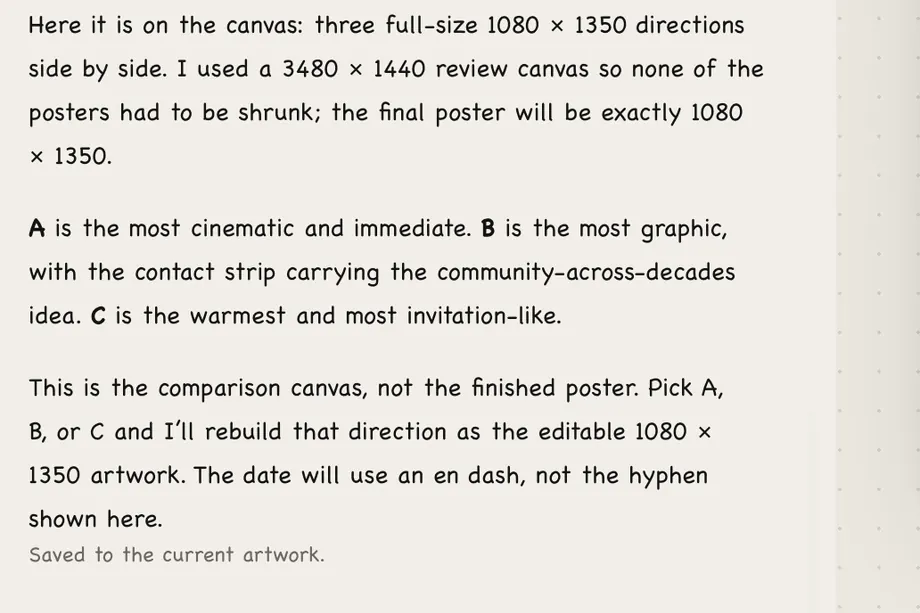
The agent’s reply: this is the comparison canvas, not the finished poster; pick A, B or C and it will rebuild that direction as the editable 1080 × 1350 artwork
你来定You decide它说明每套的特点,然后停下来等你。选好一套,它再做成可编辑的稿子。It explains each direction, then waits. Pick one and it rebuilds that one as editable artwork.

为什么是 Molly · 留在本机Why Molly · On your Mac

稿子和密钥都在你的 Mac 上Your files and keys stay on your Mac

作品、版本和对话存在本地。模型请求直接发给你自己配置的服务商。Artwork, versions and chats are stored locally. Model requests go straight to the providers you set up.

  • 作品、版本和对话都存在本地,不需要 Molly 云账户。Artwork, versions and chats are stored locally. No Molly cloud account.
  • 密钥存在系统加密存储里。第一次启动时,macOS 可能会请求允许 Molly 使用钥匙串,选「始终允许」即可。Keys are kept in the system’s encrypted storage. On first launch macOS may ask to let Molly use the Keychain. Choose Always Allow.
  • 模型和图片的费用由你配置的服务商直接收取,Molly 不代收,也不转售。The providers you configure bill you directly for model and image use. Molly doesn’t collect or resell it.
  • 换电脑或备份时,作品和数据可以直接拷走;加密保存的密钥可能需要在新机器上重新填一次。When you back up or move to a new Mac, your work copies over like any files. Encrypted keys may need to be entered again on the new machine.

作品Work

都是 Molly 做出来的All made in Molly

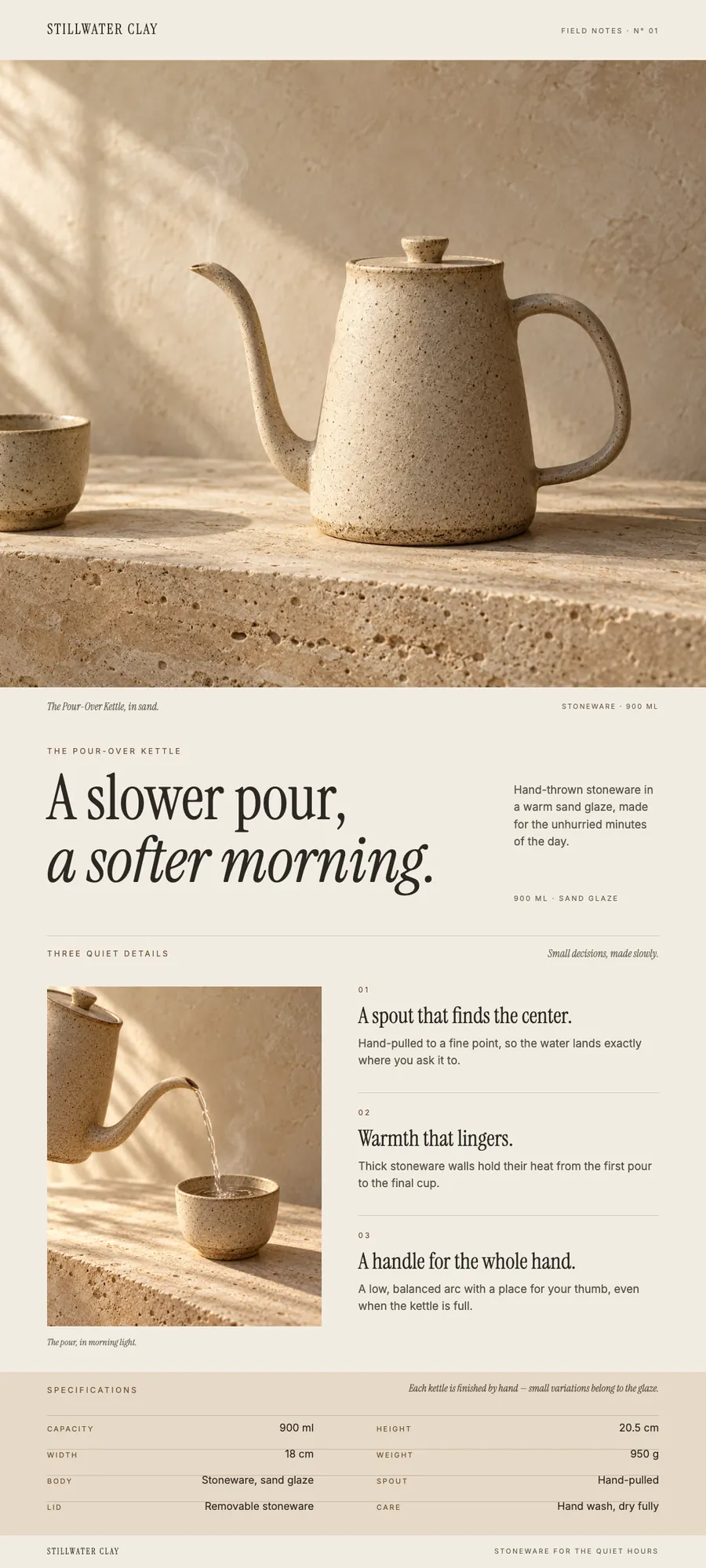
下面每一张都是在 Molly 里跑出来、直接导出的稿子。品牌和活动都是虚构的。Every piece below was made in Molly and exported as is. The brands and events are made up.Molly 导出原图Exported from Molly

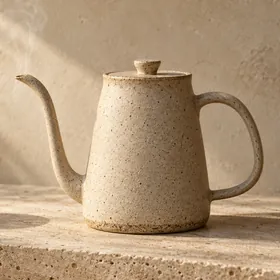
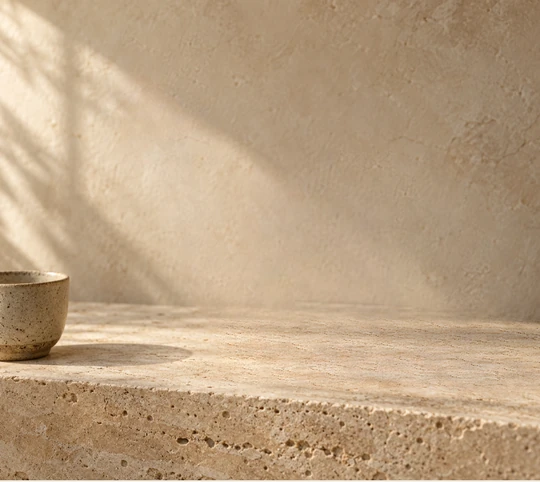
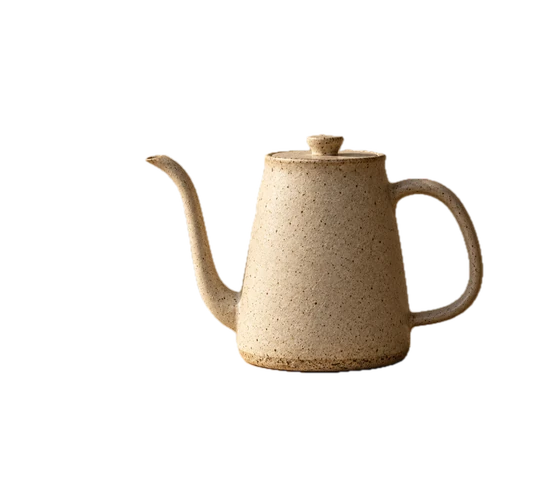
A long product page for a ceramic pour-over kettle: hero photo, headline, three details and a spec table
商品详情页Product detail page虚构陶器品牌的手冲壶,1080 × 2400。标题、卖点和规格表都是文字图层。A pour-over kettle for a made-up pottery brand, 1080 × 2400. Headline, details and spec table are all text layers.
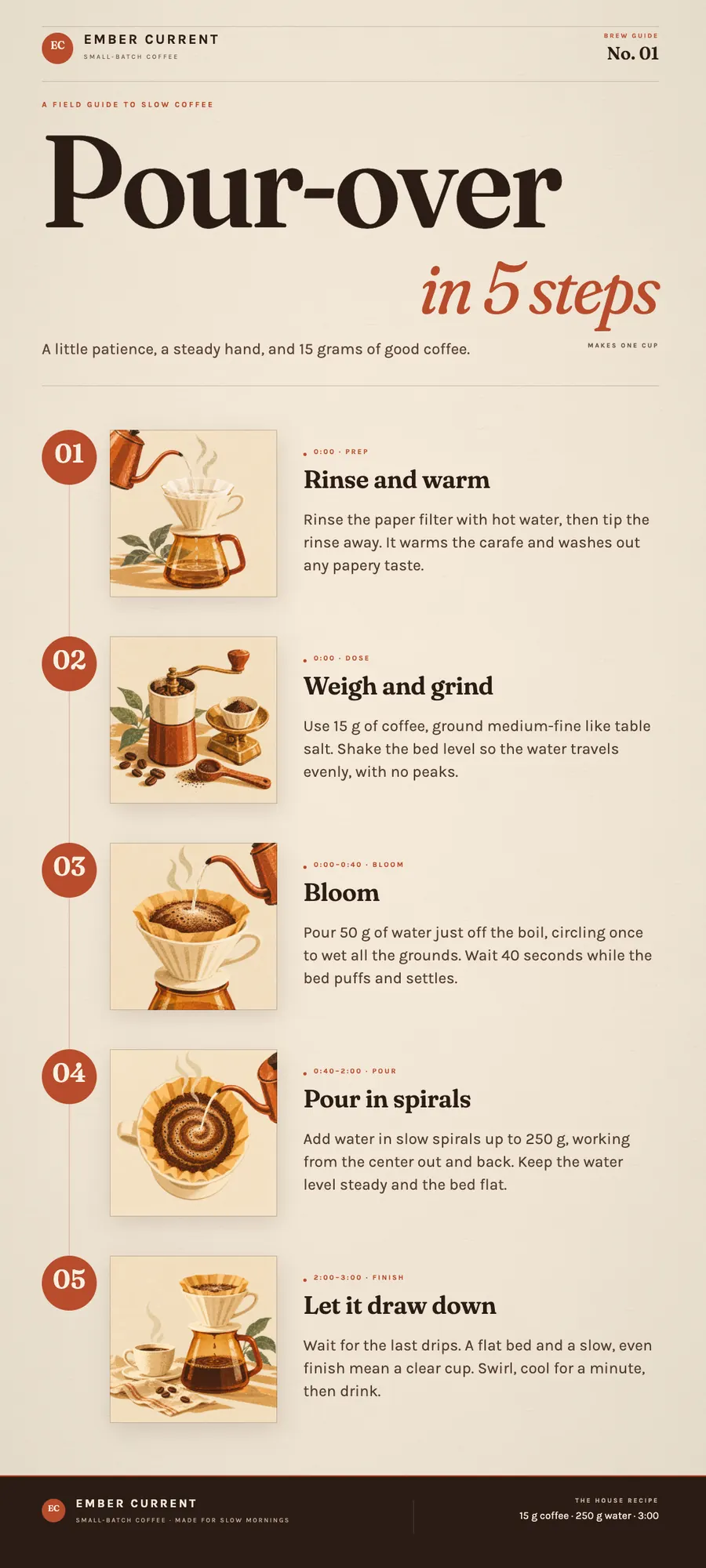
A long how-to graphic for pour-over coffee: five steps, each with an illustration and a short explanation
长图Long-form graphic虚构咖啡品牌的冲煮指南,1080 × 2400。分成五个模块,每块都能单独改。A brew guide for a made-up coffee roaster, 1080 × 2400, in five modules you can edit one at a time.
A design-week key visual: the headline IDEAS IN MOTION beside a red ribbon wrapped around a glass sphere
活动主视觉Key visual虚构设计周的横版主视觉,1920 × 1080。A landscape key visual for a made-up design week, 1920 × 1080.
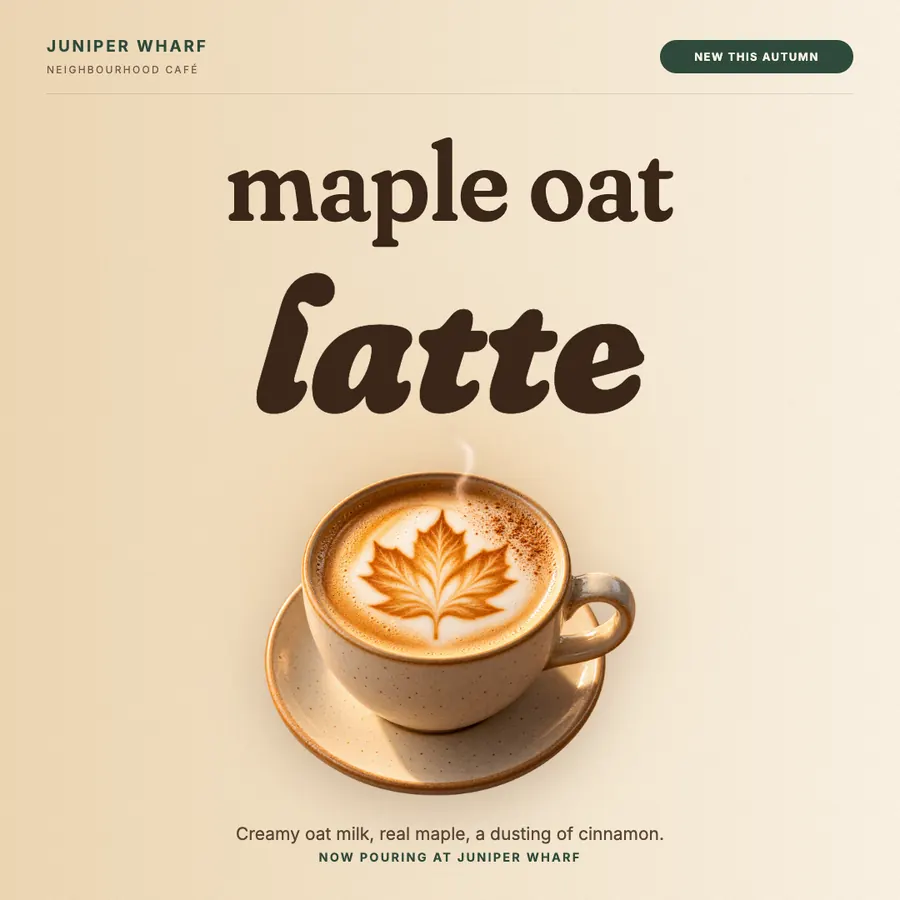
A café social post: the words maple oat latte above a latte with leaf art
社媒图Social post街角咖啡馆的秋季新品方图,1080 × 1080。An autumn special for a neighbourhood café, 1080 × 1080.
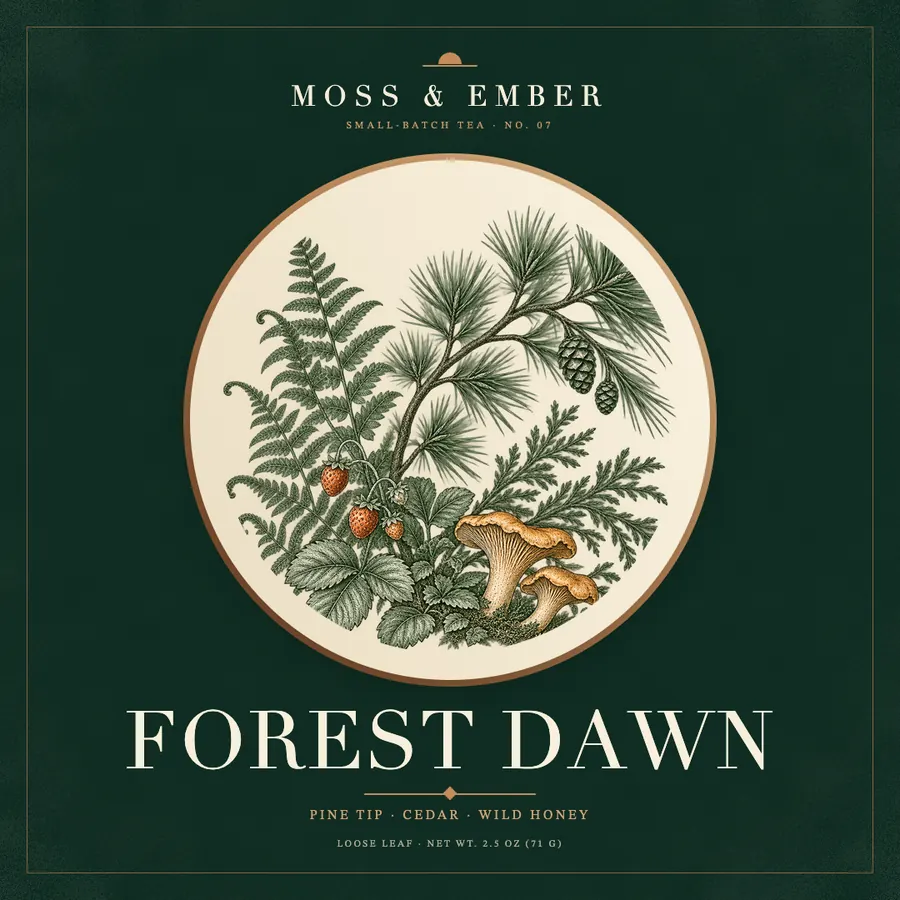
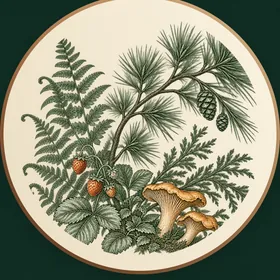
A tea label: a botanical engraving in a round window on deep green, with the name FOREST DAWN
包装标签Packaging label小批量茶叶的标签,1080 × 1080。净含量这样的小字也是能改的文字。A small-batch tea label, 1080 × 1080. Even the net weight is editable text.

对比Compare

和一键出图的工具比Compared with one-shot image tools

维度Aspect一键出图工具(泛指)One-shot image toolsMolly Design
交付物What you get多为一张扁平图片Usually one flat image可编辑的分层稿An editable, layered file
改文案Changing copy往往要重新生成Often means regenerating直接改文字层,或在对话里改Edit the text layer, or ask in chat
对齐和微调Alignment and fine-tuning较弱,或靠重新抽Limited, or you reroll选中图层、对齐、填数值Select layers, align, type exact values
设计方向Design direction一次生成,看运气One roll of the dice先找参考,给几套方向,再落图层References first, a few directions, then layers
模型Models通常绑定某个平台Usually tied to one platform本地配置,用你自己的连接和密钥Set up locally, with your own connections and keys
数据在哪Where data lives常在服务商的云端Often in the vendor’s cloud作品和对话在你的 Mac 上Artwork and chats on your Mac
导出Export对话里的一张图An image in a chat threadPNG / JPEG · 1× / 2× / 3×PNG / JPEG · 1× / 2× / 3×

表格概括的是常见产品形态,不对应任何一家的完整功能。This sketches common product types, not any one vendor's full feature set.

模型与密钥Models & keys

用你自己的模型Bring your own models

在设置 → AI 模型里添加连接。每个会话可以选用哪个连接、哪个模型和思考强度。Add connections under Settings → AI models. For each session you choose the connection, the model and how hard it thinks.

01

OpenAI

用 ChatGPT 登录,或者粘贴 API key。Sign in with ChatGPT or paste an API key.

02

Kimi Code

会员 API key,或设备码登录。Membership API key or device-code sign-in.

03

OpenAI 兼容接口OpenAI-compatible

自定义地址,可读取模型列表。Ollama、LM Studio 这类本地服务不填密钥也能用。Any custom endpoint, with model discovery. Local services such as Ollama and LM Studio work without a key.

图片生成Image generation

图片模型单独设置Image models are set up separately

在图片生成里填兼容的接口地址、密钥和模型,和对话模型分开设置,可以随时开关。不用图片模型,也能只用文字和形状排版。Under Image generation, enter a compatible API address, a key and the model. It is separate from the chat model and you can switch it off. Without it, Molly still lays out type and shapes.

能用哪些模型,取决于服务商和你的密钥。Which models you can use depends on the provider and your key.

常见问题FAQ

常见问题Common questions

没找到答案?Didn’t find your answer? 在 GitHub 上提问Ask on GitHub ↗

01系统要求是什么?What do I need to run it?

一台 Apple Silicon 芯片的 Mac,系统为 macOS Ventura 或更新。目前不支持 Intel Mac。A Mac with Apple Silicon running macOS Ventura or later. Intel Macs aren’t supported.

02怎么安装?How do I install it?

下载 DMG,打开后把 Molly.app 拖进「应用程序」。应用经 Developer ID 签名并通过 Apple 公证,可以直接打开。Download the DMG, open it and drag Molly.app into Applications. The app is signed with Developer ID and notarized by Apple, so it opens normally.

03要付费吗?模型费用谁出?Does it cost anything? Who pays for the models?

Molly 可以免费下载。模型和图片调用的费用,由你配置的服务商直接向你收取,Molly 不代收也不转售。Molly is free to download. The providers you configure bill you directly for model and image use. Molly doesn’t collect or resell it.

04我的稿子和对话会上传到 Molly 吗?Do my designs and chats get uploaded to Molly?

不会。作品、版本和对话都存在本地,Molly 没有云账户。模型请求直接发给你配置的服务商。No. Artwork, versions and chats are stored locally, and Molly has no cloud account. Model requests go straight to the providers you configure.

05支持哪些模型?Which models can I use?

取决于你添加的连接:OpenAI、Kimi Code,以及任何 OpenAI 兼容接口(包括本地的 Ollama、LM Studio)。图片模型另外设置。具体能用哪些,看服务商和你的密钥。That depends on what you connect: OpenAI, Kimi Code and any OpenAI-compatible endpoint, including local Ollama and LM Studio. Image models are set up separately. The exact list depends on the provider and your key.

06没有图片模型能用吗?Can I use it without an image model?

可以。只用文字和形状排版不需要图片服务,图片生成是可选的。Yes. Layouts with type and shapes don’t need an image service. Image generation is optional.

07和直接让聊天 AI「做张海报」有什么不同?How is this different from asking a chat AI for a poster?

聊天里出图,通常给你一张扁平的结果。Molly 会先找参考、给几套方向,再把选中的方向做成可编辑的图层:可以对齐、改字、回到旧版本,最后在本机导出 PNG 或 JPEG。A chat tool usually hands you one flat image. Molly looks for references, offers a few directions, and builds the one you pick as editable layers. You can align, reword and roll back, then export PNG or JPEG on your Mac.

08能做印刷稿吗?Can I make print files?

目前尺寸用像素预设,没有出血和毫米单位,更适合屏幕和社媒用途。Sizes are pixel presets for now, with no bleed or millimetre units, so it suits screen and social work best.

09怎么更新?How do I update?

在应用里检查更新,也可以随时在本页重新下载 DMG。Check for updates in the app, or download the DMG again from this page at any time.

Molly Design

在你的 Mac 上试试Try it on your Mac

免费下载。应用经 Developer ID 签名并通过 Apple 公证。Free to download. The app is signed with Developer ID and notarized by Apple.

GitHub 源码Source on GitHub反馈问题Report an issue